Designing for Inclusion
Designing for Inclusion
Designing for Inclusion
Designing for Inclusion
Designing for Inclusion
Designing for Inclusion
Aug 2023

As someone who transitioned into product design with no technical experience, it was pretty challenging figuring out all the different features in Figma, especially how to use components. It can be tricky at first, but once you know how to use components, it’s like having a magic wand that can help you make all kinds of cool things. Don’t worry; it’s normal to feel slightly confused at first! It just gets better with practice. In this article, I’ll break down the basics of components in Figma and how it helped me take my design workflow to the next level.
As someone who transitioned into product design with no technical experience, it was pretty challenging figuring out all the different features in Figma, especially how to use components. It can be tricky at first, but once you know how to use components, it’s like having a magic wand that can help you make all kinds of cool things. Don’t worry; it’s normal to feel slightly confused at first! It just gets better with practice. In this article, I’ll break down the basics of components in Figma and how it helped me take my design workflow to the next level.
What are components?
Components are design elements that can be reused in our design projects. Examples are buttons, forms, text fields etc
What are components?
Components are design elements that can be reused in our design projects. Examples are buttons, forms, text fields etc
Understanding Components
I like to think of components in Figma like LEGOs. You know how when you play with LEGOs, you can take a bunch of different blocks and put them together to make something new? It’s kind of like that with components. You can take a button, text box, or image and use them over and over again in different parts of your design. Here are a few ways I use components in my designs to take my workflow to the next level
Save Time: Let’s imagine you’re making a website and want a “Sign Up” button. You can make the button once and then use it everywhere you need it on the website instead of creating a new button every time. And if you ever need to change the button, you can change it in one place, and it will update everywhere else too! Just like magic!
Consistent Designs: When you create a component, you can ensure that the same design elements, such as buttons or forms, are used consistently throughout your project. This makes it easy to maintain a cohesive design and ensures that your users have a consistent experience.
Keeping your art board organized: Working on a messy canvas is really hard for me, and using components makes it easier for organization. Instead of sifting through multiple pages and layers, you can access the components you need from a dedicated library. It also makes it easier for other designers or developers to understand your design and pick up where you left off. This can be especially helpful when working on a large project with multiple team members
Understanding Components
I like to think of components in Figma like LEGOs. You know how when you play with LEGOs, you can take a bunch of different blocks and put them together to make something new? It’s kind of like that with components. You can take a button, text box, or image and use them over and over again in different parts of your design. Here are a few ways I use components in my designs to take my workflow to the next level
Save Time: Let’s imagine you’re making a website and want a “Sign Up” button. You can make the button once and then use it everywhere you need it on the website instead of creating a new button every time. And if you ever need to change the button, you can change it in one place, and it will update everywhere else too! Just like magic!
Consistent Designs: When you create a component, you can ensure that the same design elements, such as buttons or forms, are used consistently throughout your project. This makes it easy to maintain a cohesive design and ensures that your users have a consistent experience.
Keeping your art board organized: Working on a messy canvas is really hard for me, and using components makes it easier for organization. Instead of sifting through multiple pages and layers, you can access the components you need from a dedicated library. It also makes it easier for other designers or developers to understand your design and pick up where you left off. This can be especially helpful when working on a large project with multiple team members
Creating Components
Now, to the primary purpose of this article, how do I create a component? Here are two easy steps in creating a component.
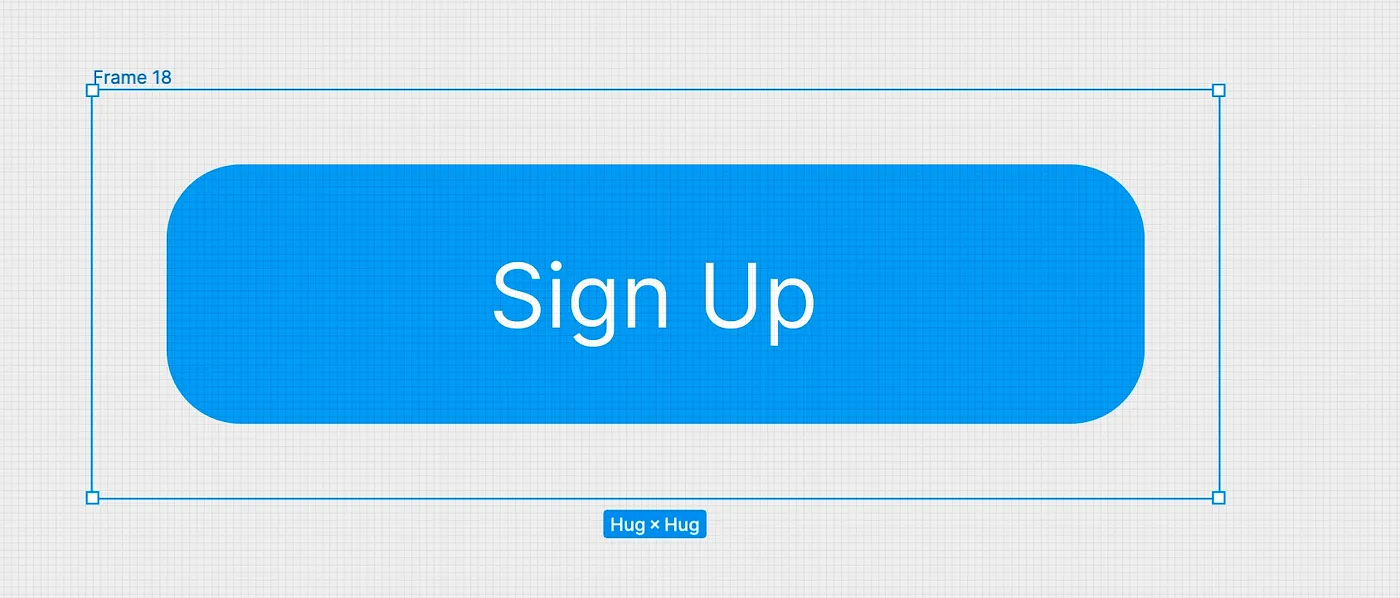
Step 1: Select an item or frame you want to turn into a component — for example, a button.
Creating Components
Now, to the primary purpose of this article, how do I create a component? Here are two easy steps in creating a component.
Step 1: Select an item or frame you want to turn into a component — for example, a button.
Step 2: Create the actual component; this step has three methods
Keyboard shortcuts: ⌥ Option ⌘ Command K (Mac) or Ctrl + Alt + K.(Windows)
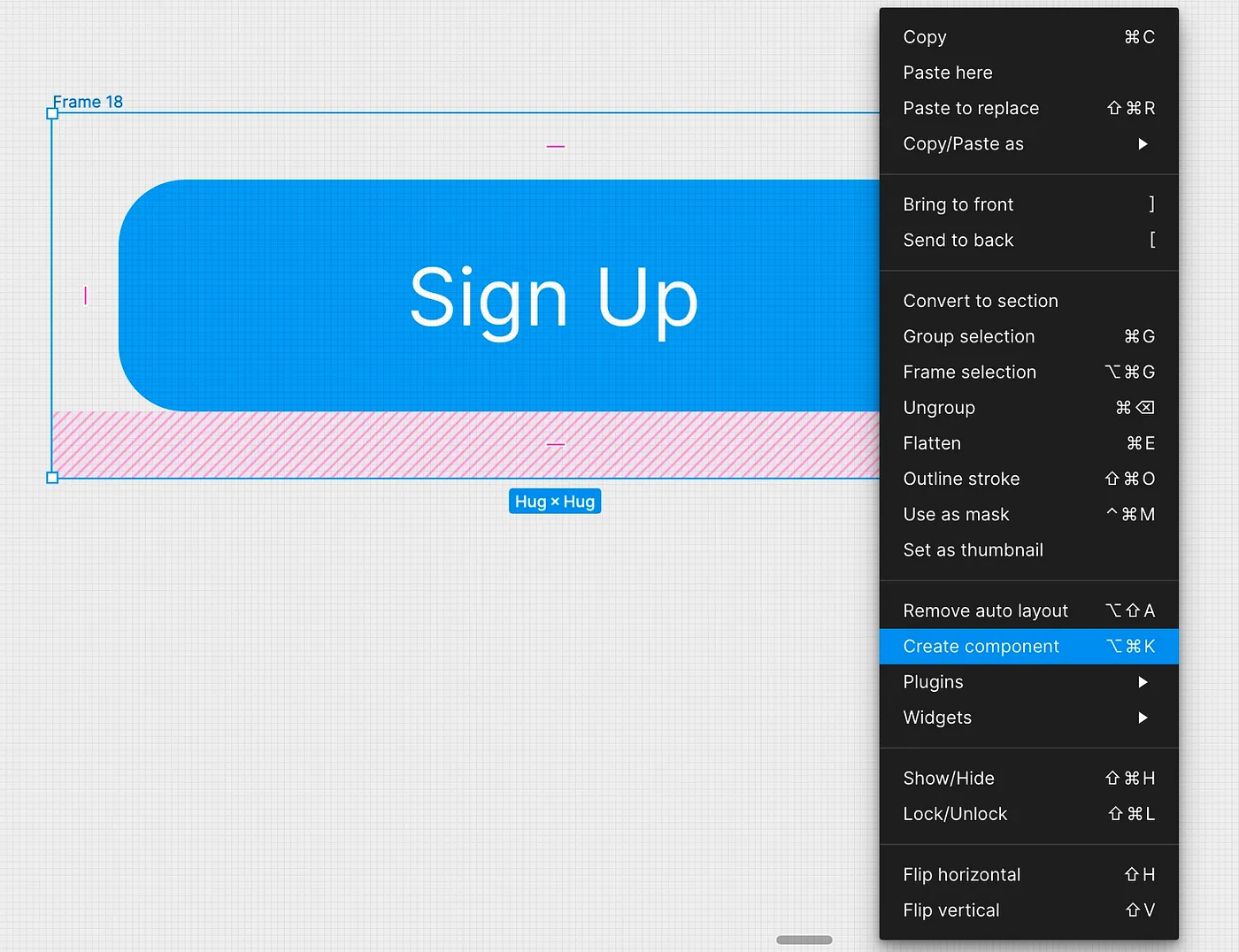
Right-click and select “create component” from the menu.
Step 2: Create the actual component; this step has three methods
Keyboard shortcuts: ⌥ Option ⌘ Command K (Mac) or Ctrl + Alt + K.(Windows)
Right-click and select “create component” from the menu.
Click the create component icon on the top of the screen.
Click the create component icon on the top of the screen.
Conclusion
Understanding how to use Components in Figma has been a game-changer for me. It has dramatically improved my productivity as a product designer, and I hope this article has shown you how it can do the same for you.
Conclusion
Understanding how to use Components in Figma has been a game-changer for me. It has dramatically improved my productivity as a product designer, and I hope this article has shown you how it can do the same for you.
More Posts
Crafting delightful user Experience
Have you ever had the experience of stepping into a Miniso store and feeling an instant rush of excitement? Miniso is a popular retail chain known for its...


Crafting delightful user Experience
Have you ever had the experience of stepping into a Miniso store and feeling an instant rush of excitement? Miniso is a popular retail chain known for its...
Crafting delightful user Experience
Have you ever had the experience of stepping into a Miniso store and feeling an instant rush of excitement? Miniso is a popular retail chain known for its...
Crafting delightful user Experience
Have you ever had the experience of stepping into a Miniso store and feeling an instant rush of excitement? Miniso is a popular retail chain known for its...
Crafting delightful user Experience
Have you ever had the experience of stepping into a Miniso store and feeling an instant rush of excitement? Miniso is a popular retail chain known for its...
Designing for Inclusion
Accessibility in design is not just a trend or a regulatory checkbox; it's a fundamental aspect of creating inclusive digital experiences.

Designing for Inclusion
Accessibility in design is not just a trend or a regulatory checkbox; it's a fundamental aspect of creating inclusive digital experiences.
Designing for Inclusion
Accessibility in design is not just a trend or a regulatory checkbox; it's a fundamental aspect of creating inclusive digital experiences.
Designing for Inclusion
Accessibility in design is not just a trend or a regulatory checkbox; it's a fundamental aspect of creating inclusive digital experiences.
Designing for Inclusion
Accessibility in design is not just a trend or a regulatory checkbox; it's a fundamental aspect of creating inclusive digital experiences.